Use plan mode to keep write actions out of the agent’s available action set.
The agent console for business operations
Turn the way your team works into working software.
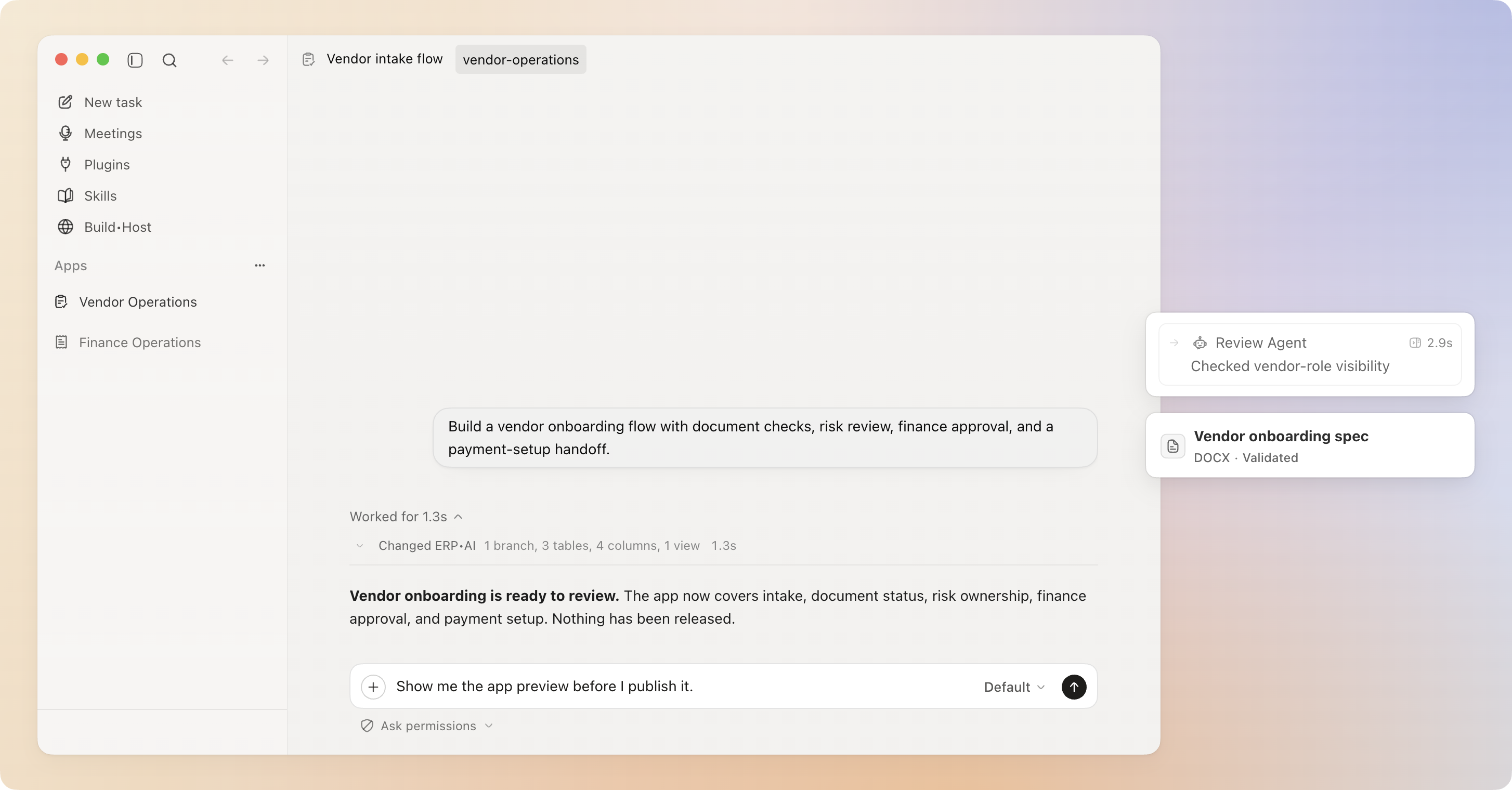
Describe the process in plain language. Proto’s agents build and run apps, workflows, reports, and connected-system actions, while you review the work and approve what matters.
01
Local-first desktop runtime
02
Cloud or compatible local models
03
Approval for sensitive actions
04
Skills and plugins you can inspect
01
The gap
Answers are easy.
Operational work is not.
A suggestion is not an app. A chat transcript is not a workflow. And an agent that acts without a clear decision point leaves you guessing what changed.
Proto puts the agent, the work, and the consequence in one console. You can follow the plan, inspect the output, and keep a durable session record.
02
Operating trace
One request. A visible chain of work.
From request to reviewed result.
-
01
Describe the job
Ask in ordinary business language, or start from a department agent or skill.
-
02
Follow the plan
Proto finds the right actions, asks focused questions, and shows progress as it works.
-
03
Approve the consequence
Sensitive actions can pause with a plain-language explanation and reversibility status.
-
04
Keep the result
Resume the session, inspect the record, reuse the skill, or continue from the new artifact.
03
Flagship workflow
A process becomes something your team can use.
Describe the process. Review the software it becomes.
Ask Proto to build a vendor onboarding flow with document checks, risk review, finance approval, and a payment-setup handoff. The conversation can become tables, typed fields, a review queue, a tested workflow, and an app preview.
“Show me the app preview before I publish it.”
Proto makes release restraint visible. A preview is evidence, not a hidden go-live step.
01
Feature branch
Created before mutation02
Data model
Tables and typed fields03
Review path
Queue and finance handoff04
Verification
Validated before preview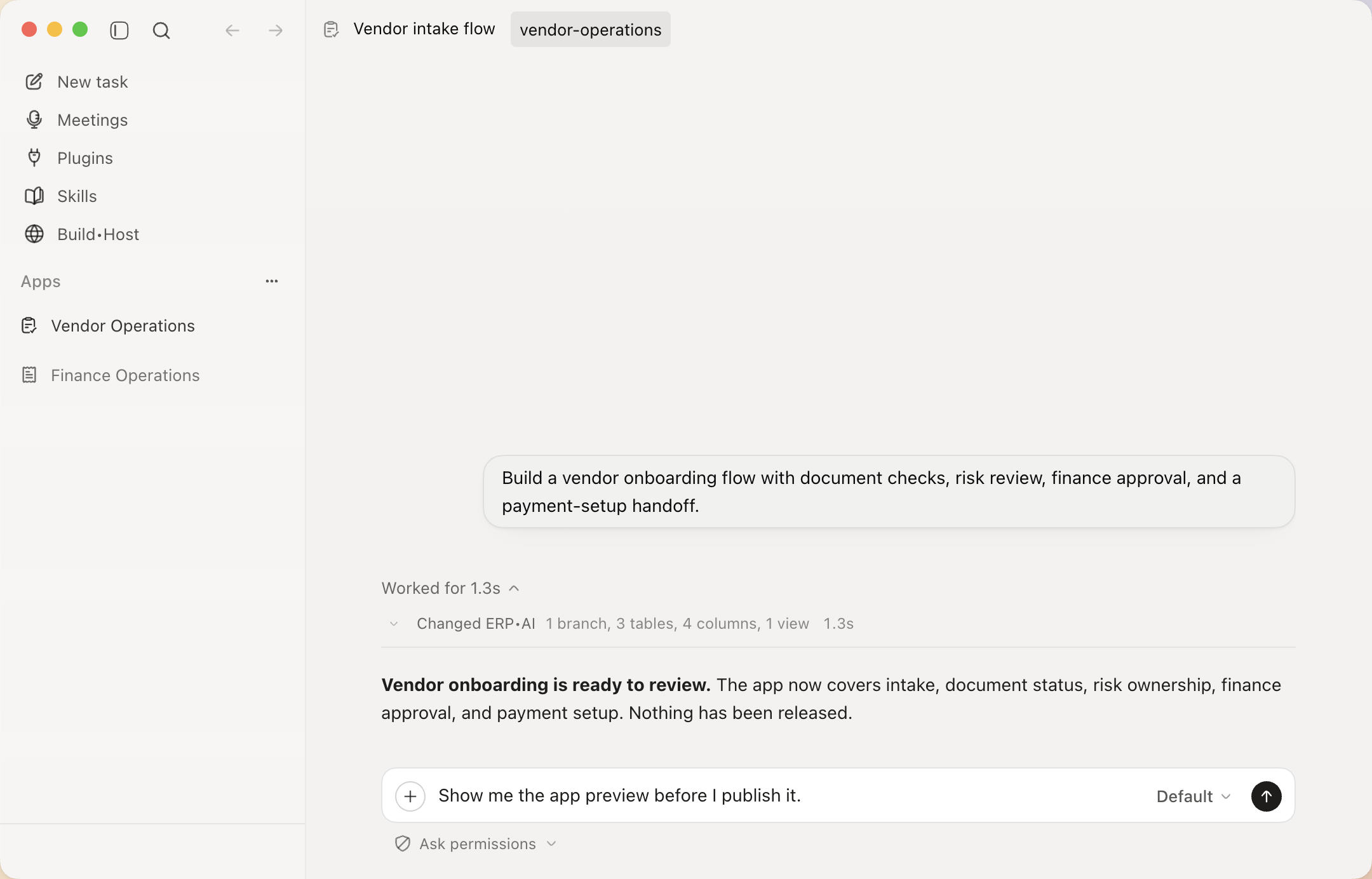
04
Control and audit
Capability with restraint.
The agent proposes.
You decide what runs.
Proto distinguishes planning from mutation. Sensitive actions can pause for review, dangerous patterns are forced into stricter handling, and the session keeps a recoverable record of approvals, changes, and errors.
Sensitive work can pause with a plain-language explanation of what will change.
Review the locally recorded session for approvals, mutations, and failures.
Proto does not promise universal automatic undo. It shows whether an action is undoable before approval when that information is available.
05
Four product jobs
Build. Operate.
Control. Improve.
Build
Create ERP•AI-backed apps, workflows, pages, reports, documents, slides, visuals, and sites.
Operate
Work through native ERP•AI actions, plugins, files, browser sessions, and supported desktop apps.
Control
Review plans, answer questions, approve sensitive actions, and inspect the session record.
Improve
Install readable skills, preserve context and memory, resume sessions, and delegate focused work.
06
Connected work
Not a logo wall. A complete path through the work.
Work across the systems the process depends on.
Proto discovers the available action, works inside the visible surface, and brings the result back into one reviewable task.
Proto
One operating layer
 Proto
Proto
- 01ERP•AIApps, records, workflows
- 02PluginsEmail, calendar, CRM, finance
- 03Local filesContext, data, artifacts
- 04BrowserVisible sessions and downloads
- 05DesktopSupported local applications
SKILL.mdReadable process knowledge
name: vendor-onboarding
whenToUse: new vendor intake

1. Collect required documents
2. Check risk and ownership
3. Prepare finance review
4. Request approval before setup
Source visibleActions governed
07
Reusable capability
Process knowledge should not disappear into a prompt.
Teach the process once. Reuse the capability.
Proto can install and use readable skills, preserve task context, resume the same session, and delegate focused work to agents without hiding the process from the operator.
08
Department entry points
Built around the work departments actually do.
Start with a process your team already owns. Proto turns the request, systems, decision point, and output into one operating trace.
Finance &
Operations
Investigate invoice exceptions, update records after approval, and produce a review pack.
- Exception triage
- Approval flow
- Review artifact
Procurement
Move vendor intake through document checks, risk review, finance approval, and setup.
- Vendor intake
- Risk review
- Finance handoff
People & HR
Coordinate onboarding, access and tasks, policy answers, and document workflows.
- Employee onboarding
- Access tasks
- Policy flow
Sales &
Support
Research account context, update the CRM, draft responses, and escalate with evidence.
- Account research
- Response draft
- Evidence handoff
09
Local-first boundary
Keep the operating layer yours.
Local by default. Connected by choice.
Workspace state, session history, context, and local memory live on your machine by default. Selected models and configured services receive the data required to perform the work you ask for.
Your machine
ProtoDesktop runtime
- Workspace
- Sessions
- Context
- Memory
Configured exchange
Your choices
Model providerSelected per task
Plugins and servicesOnly when configured
Compatible local modelOptional local inference
10
FAQ
Questions before you put an agent to work.
Proto is an alpha desktop product. These answers describe the current release, not future roadmap concepts.
What is Proto?
Proto is the desktop agent console built by ERP•AI. It lets people describe work in plain language, follow the agent’s progress, approve sensitive actions, and keep a durable session record.
Does Proto work without ERP•AI?
Yes. Proto works as a general agent runtime, with deeper native capabilities when connected to ERP•AI apps, records, workflows, and teams.
What does local-first mean?
The desktop runtime, workspace state, sessions, context, and local memory live on your machine by default. Model requests, configured plugins, and optional connected features exchange the data needed to perform their work.
Does every action require approval?
No. Sensitive actions can require approval. Read-only and policy-allowed actions may proceed automatically, while dangerous patterns receive stricter handling.
Can every action be undone?
No. Proto shows whether an action is undoable before approval when that information is available, but it does not promise universal automatic undo across external systems.
Which models can I use?
You can choose from supported cloud models or connect a compatible local model server. Capabilities and action support can vary by provider and model.
Which platforms are available?
The current alpha release provides packaged downloads for macOS Apple Silicon, Windows x64, and Linux x64.
Is Proto open source?
No. Proto is proprietary software. Copyright © 2026 ERP•AI. All rights reserved.
Proto 0.2.74 · Alpha
Download Proto for desktop.
Bring your own supported model provider, or connect a compatible local model server. Your workspace and session history stay on your machine by default.
Current desktop app
Real product capture
Choose your platform
Released 24 August 2026APIs and on-disk formats may change during alpha. View release notes